
Decide what must remain recognizable
Identify the features that make the subject recognizable: a particular hairstyle, a pet's ear shape, glasses, an expression, or the relationship between two figures. Those features need enough cells and contrast to remain visible in the chart.
For a pet portrait, you might want the whole curled-up pose or just the face and ear markings. Choose the crop around the features you want to keep.
DMC's photo-selection advice points to focus, contrast, a clear subject, and a plain background. Check those features again in the converted chart; a sharp source can still lose detail when reduced to a small grid.
Compare how much of the grid the face occupies
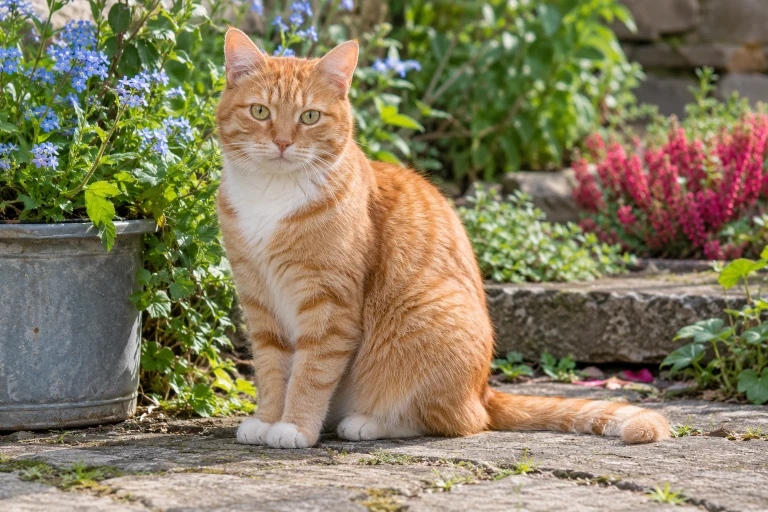
Wider crop
Keep the setting when it matters to the portrait. Notice how much of the crop the face occupies.
View original photoCloser crop
The closer square crop gives more of the chart to the face. At the same chart size, more cells can describe its features.
View original photoFor example, keep a conversion 60 cells wide while comparing crops. The face's share of the image width determines how many chart cells are available for it:
| Framing | Face's share of the width | Cells across the face |
|---|---|---|
| Wide scene | One fifth | 12 |
| Closer crop | One half | 30 |
Try a closer crop at your intended chart size. Keep the image in proportion rather than stretching it to fit. More of the available cells can then describe the face, though you may lose part of a pose or setting you wanted to keep.
Check focus at the feature level
Enlarge the source around the eyes, mouth, fur markings, or other important detail. If those features are blurred, look for another photo. Increasing the image dimensions won't restore detail that was out of focus.
Watch for deep shadows crossing an eye, strong glare on glasses, or a pale subject merging into the background. You can sometimes improve the crop or select another image before doing detailed chart cleanup.
Simplify the background deliberately
A leafy garden can contain many little color changes. If the setting matters, keep the part that identifies it. If the pet is the subject, a quieter background can make its silhouette easier to read and reduce scattered stitching.
Try covering the background on a copy of the image or testing a simpler backdrop. Look particularly at the boundary around hair, ears, and shoulders. Removing all background variation can also remove a useful edge, so inspect the subject outline after simplification.
Use images you own or have permission to adapt. A publicly visible photo is not automatically permission to turn it into a distributed chart.
Compare the resulting charts
In the converted chart, look for the features that drew you to the photo. Separate eyes and a distinctive stripe may be worth keeping; a large patch from a shadow or scattered background cells may need simplifying.
Look at both the normal display size and an enlarged grid. A large on-screen preview can make a tiny feature appear more convincing than it will at the finished physical size. Fabric count determines the size of each cross; increasing fabric count doesn't add more cells to the portrait.
Our color-palette guide helps you distinguish light, midtone, and shadow decisions. The confetti guide explains why some isolated cells deserve to stay while others can be simplified.
Keep a copy of the chosen crop alongside the chart.